🍋 Lemory

Your memory should belong to you

Turn your Obsidian/Markdown notes into memory for every AI you use. Not rows in someone's database, but files in your own folder.

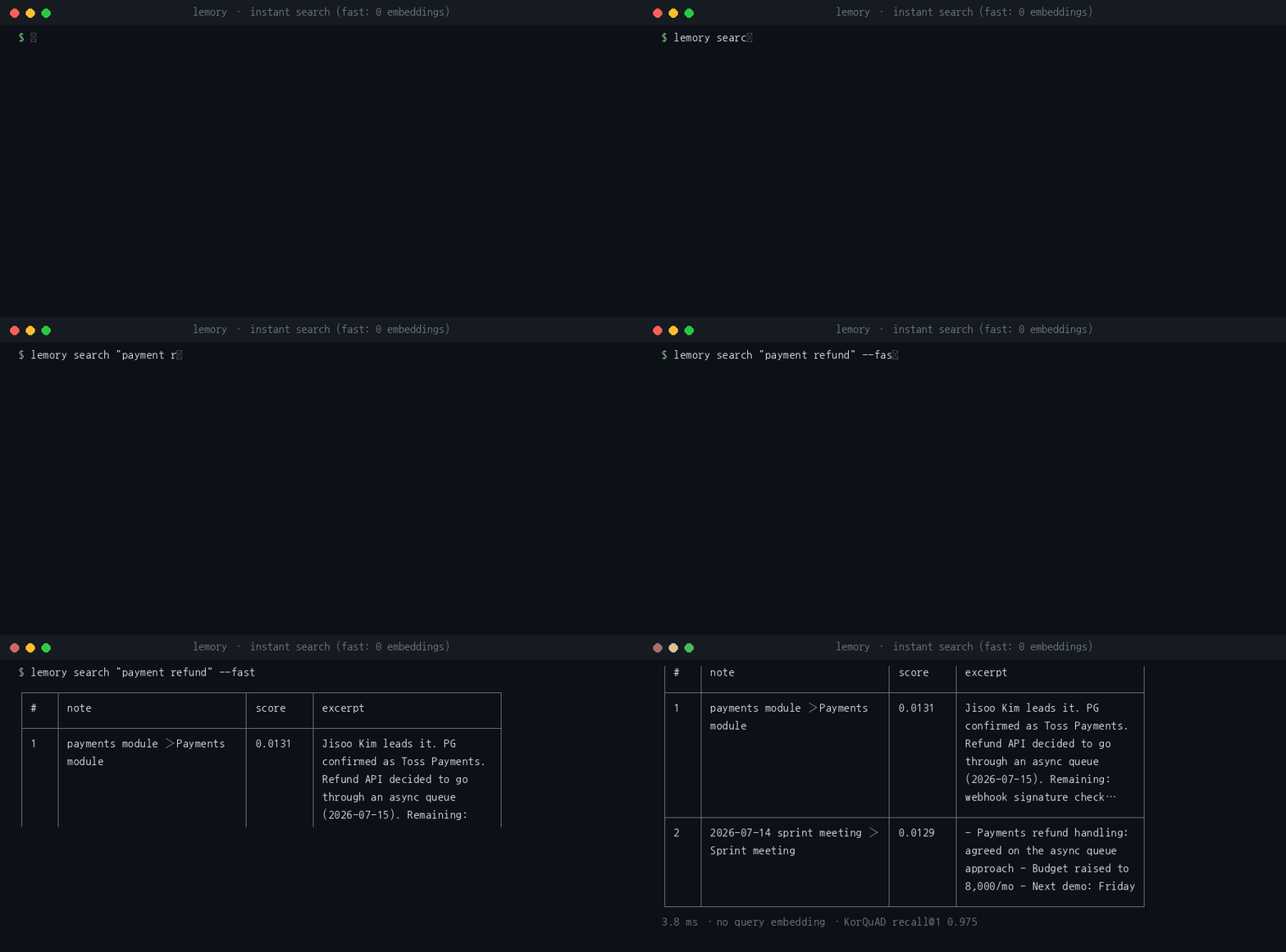
Start in one minute Keyless, free, everything runs on your machine Live instant search: an English question answered from the demo vault in milliseconds, no query embedding Not a mockup, a real capture of the CLI. Instant lexical search in ~3.8ms, no query embedding, no API call. (On a 1,469-doc vault too; see the benchmarks.)
Why

Why we built this

Today's AI memory products want your knowledge as rows in their database. They summarize what you said and store the summary. Information is lost at write time, you can't verify it later, and if you ever leave the service, your memory stays behind.

We think differently: the Markdown files you already own are the better database. They have dates, original wording, git history, and one rm deletes them. Lemory sits between those files and your AI, and does three things:

AI reads your memory

Hybrid retrieval: semantic + CJK-aware keyword search + your [[wikilink]] graph. Benchmarked against every competitor we can run. Losses published too.

AI writes your memory

Decisions and facts land as plain .md notes in your vault, with duplicate detection and automatic related-links.

You see everything

Every query, every note an AI wrote (one-click undo), per-client usage. All in a dashboard, all in one local SQLite file.

One more thing: most of this space treats Korean (and CJK in general) as an afterthought. Lemory treats it as a benchmark suite: Hangul bigram indexing, syllable-level typo repair, morphology-aware matching. Ask in Korean over English notes and it still finds the answer.

Every number regenerates from committed code and public data. Losses and failed experiments are published too: BENCHMARKS.md.
Install

Install: one command

1
Install
pipx install "git+https://github.com/jwgo/lemory"

No pipx? Plain pip install works. Python 3.10+ is all you need.

2
Start
lemory up ~/Obsidian/MyVault

This one line does config → indexing → dashboard. Any folder of .md files counts as a vault (Obsidian optional).

3
Ask
lemory ask "where did I leave off on that project?"

That's it. Typos and casual phrasing are fine.

No API key required

With a Gemini key it uses the cloud; without one it runs the on-device stack that ships by default (Korean-tuned e5-small-ko-v2 embeddings + Gemma 4 answers). In fully-offline mode, not one byte of your vault leaves the machine, air-gapped environments included.

ModeNeedsYou get
On-device (default)No key, 8GB+ RAMSearch + answers, fully offline
Light localNo key, 4GB RAMSearch only (Raspberry-Pi-class OK)
Gemini cloudOne free key (no card)Search + answers, ~250 questions/day free

No LLM pipeline runs at ingest. Indexing 1,000 notes = 0 LLM calls, searchable in seconds.

Use cases

Where it shines

💼 Work & meetings

"What budget did we settle on at the Q3 kickoff?" "How did the remote policy change since last year?" The more meeting notes, the stronger it gets.

📚 Study notes

"What was the event loop again, from my notes?" Answers from what you wrote, not from the internet.

🤖 Long-term memory for AI assistants

Connect Claude/Cursor via MCP and decisions survive the session. The next session picks up where you left off.

💬 Chat memory

Import your ChatGPT/Claude exports and decisions buried in conversations become searchable a month later, with the source cited.

🎮 Games & hobbies

"What did I write down to prep for that boss?" "My golden ratio for kimchi stew" Strategy notes and recipes alike.

🏠 Life admin

"That ramen place in Osaka?" "What's step one if my lease renewal is refused?" Anything you ever wrote down.

The queries plain RAG structurally can't do

$ lemory ask "what database does the Atlas project lead prefer?"
# multi-hop: Atlas note → [[lead]] wikilink → that person's note has the answer

$ lemory ask "what book have I been reading lately?"   # picks the CURRENT one
$ lemory ask "what was I reading in March?"            # March reaches history

Your [[wikilinks]] are already a knowledge graph. Reading them for free measured higher on multi-hop (1.000) than the graphs competitors pay LLM pipelines to build (0.53–0.81).

How to use

How to use it day-to-day

① Keep the server running

lemory serve        # http://127.0.0.1:8377

The Obsidian plugin, Claude/MCP, and the web dashboard all attach here. Edit notes while it runs and they re-index within seconds. One-off lemory ask works without it.
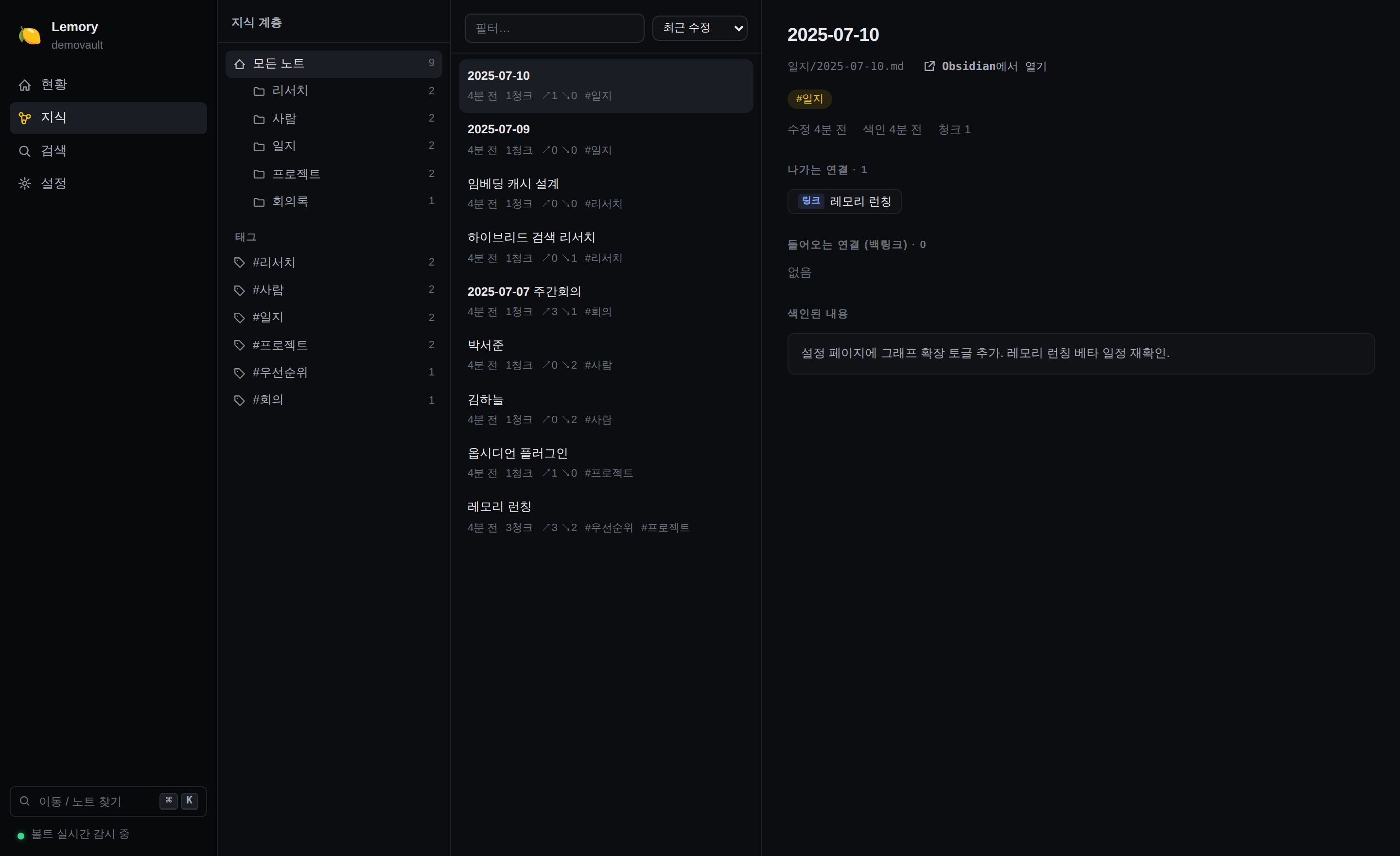
Dashboard knowledge tab: note detail, local graph, related notes

② Connect your AI

claude mcp add lemory -- lemory mcp --vault ~/Obsidian/MyVault --client claude-desktop
lemory skill install claude-code    # teach the assistant to use it well
lemory hooks install claude-code    # auto-save session memory on exit

Cursor, Windsurf, VS Code: anything that speaks MCP works the same way. With the hook installed, every Claude Code session ends by saving the decisions worth keeping as one dated note. No discipline required.

③ Write and tend your memory

lemory remember "VPN renews every March, owner: Kim Haneul" --tags ops
lemory search "tag:meetings folder:2026 budget"   # scoped search
lemory suggest-links    # unlinked mentions → link proposals (weekly)
lemory drift            # broken links & unresolved duplicates
lemory graph --open     # the whole vault as an interactive graph

Everything an AI writes shows up in the dashboard feed with attribution and an undo button. Nothing passes through invisibly.

④ Privacy is one line

---
lemory: false
---

Put that at the top of any note and it is never indexed, never retrieved, never sent to any model. Your diary stays a diary.
Under the hood

How it works

your vault (*.md) ──watch──► parse: frontmatter · tags · [[links]] · dates
                                │
                                ▼
            one SQLite file: chunks · BM25 · link graph · embed cache
                                │
query ─► typo repair ─► dense + lexical (fusion) ─► title & recency boosts
                                │
                       1-hop graph expansion   ← multi-hop answers come from here
                                │
                                ▼
            dated, cited context ─► LLM ─► answer [n]

Search is local and LLM-free (3–13ms). One embedding call per query (cached), one generation call per answer. Past 20k chunks the vector index switches automatically: 1M chunks = 5.9ms per query.

In numbers

MeasuredLemoryContext
Multi-hop answer-in-context@81.000LightRAG 0.807 · mem0 0.579 · qmd 0.526
Retrieval latency (p50)~3msmem0 212ms · qmd 0.6–59s
KorQuAD recall@1 (keyless local)0.930BM25 0.900 · vector-only 0.840
LongMemEval 500-question Recall@50.983zero API calls, local embedder
Ingest (1,000 notes)0 LLM callssome competitors: 45 min for 54 notes

All measured on the same harness, reproducible from the repo. The axes we lose (e.g. a small English vault where vector-only edges us by one question) are printed too.

For developers

For developers

import lemory
lemory.configure(vault="~/Obsidian/MyVault")
lemory.index()
print(lemory.ask("what did I decide about pricing?").text)

REST GET /search · POST /ask · POST /memoryTS/JS zero-dep client (clients/js) Python LangChain · LlamaIndex retrievers Docker self-hosting Connector SDK lemory connect script.py pulls any source into vault notes

Details in the English README.